Home / Products / Video Surveillance / TV-8400WR

TV-8400WR

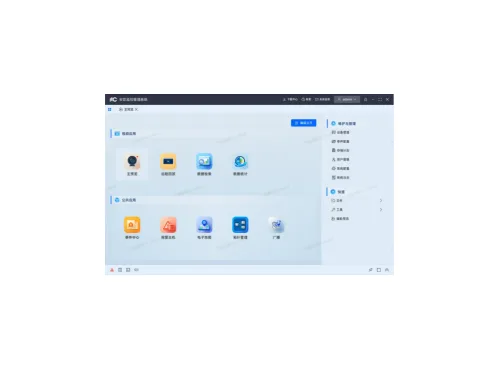
Software Security management client software V 1 . 0
TV-8400WR
Video Surveillance · Security Management Platform

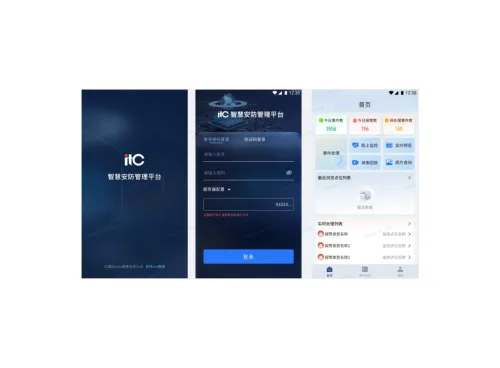
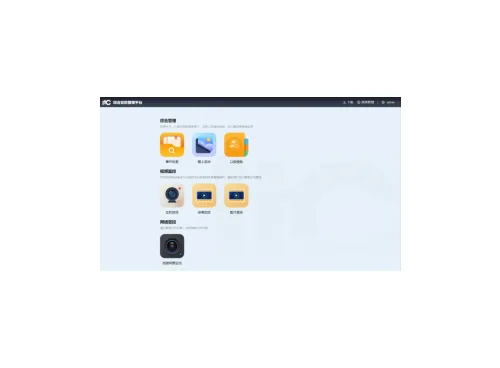
This software is applied to small and medium-sized campuses , providing all-round, efficient and safe security solutions for small and medium-sized campuses. It is a comprehensive security management software. It can achieve seamless connection of network cameras, WVR and other security equipment to cover key scenes such as building perimeters, entrances and exits, elevators, office areas, etc., build a solid and reliable video surveillance system for customers, and effectively ensure the safety and stability of the campus.

Features

  • The software runs on the domestic Linux operating system, adopts B/S architecture, and supports remote login web management; it can provide management control, data interaction, service and other functions for the security system.
  • Protocol connection: The protocol supports ITE private protocol, GB28181 protocol, Hikvision SDK private protocol, Dahua SDK private protocol, and 0nvif protocol device access;
  • Transmission encryption : Internal communication within the system, data interaction between the platform and the mobile terminal are all encrypted using the national encryption algorithm to ensure that the transmitted data is secure and reliable ;
  • Real-time preview: The real-time preview module supports image capture, video recording, volume control, mute switch, instant playback, voice intercom, electronic amplification, stream switching, PTZ control, closing all previews, screen splitting (up to 64 screens), screen adaptation (fixed ratio, adaptive stretching), full-screen operation, system configuration, and custom resource view ;
  • PTZ control support: support up, down, left, right, upper left, upper right, lower left, lower right angle control, speed control, focus and aperture adjustment, support preset points, track and cruise functions. Support expert mode (3D positioning, auxiliary focus, lens initialization, lights, wipers, manual tracking, menu, one-key cruise, one-key watch, lens deicing, manual face capture, synchronous field of view, regional focus, regional exposure, deployment tracking, PTZ deicing and other functions) ;
  • Patrol function: Patrol supports patrol plan setting, multi-window patrol and single-window patrol functions. The patrol plan can set the content, name, and patrol time of the patrol plan, and can control the start, tentative, and resume of the patrol plan;
  • Preview interface tools: Preview interface tools include three categories: general equipment tools, special equipment tools and more functions. General equipment tools include: capture, recording, voice transcription, electronic zoom, instant playback, and bitstream; special equipment tools include: fisheye, intelligent tracking, fire point frame, PTZ projection, click temperature measurement, alarm elimination, linkage access control point, display shielding area, display exhaust information, lock operation, and alarm output control; more functions include: stop preview, capture, other capture, start recording, enable window PTZ control, enable electronic zoom, switch to instant playback, fire point information, display shielding area, display exhaust information, close intelligent rules, bitstream, start intercom, start IP channel intercom, turn on sound, monitoring point status, time calibration, turn on temperature measurement display, fisheye expansion, start ball camera linkage, and full screen;
  • Video playback: supports synchronous and asynchronous playback of code stream information, volume control, multi-monitoring point download, single-frame reverse playback, single-frame play, reverse playback, pause/start, deceleration/acceleration, close all, split, full screen, configuration, screening, editing, human body/vehicle;
  • Event playback: supports playback of events, with two modes: video search and image search;
  • Video retrieval: Supports video retrieval by time, event type, and tag. The retrieved videos support playback, detail viewing, and export functions;
  • Face search: supports face search by event type, image search, name search and face attribute search. The searched videos support playback, detail viewing, export, image search and adding to face library.
  • Human body search: Image search based on target capture events, and can play 5 seconds of video before and after the searched image, supporting search by image and person attributes;
  • Abnormal behavior recognition: Abnormal behavior recognition mainly analyzes people's related behaviors. The client retrieves and displays pictures from the device by retrieving the specified behavior. It also supports functions such as searching and viewing related pictures and playing their video files. It is mainly used in important environments such as schools, industrial parks, and streets where real-time supervision is not possible due to limited supervision personnel.
  • Vehicle detection: The vehicle search function can search for vehicles, license plates, and traffic violations that meet the conditions according to the set condition information; if the device has configured events and linked snapshots or videos, when an event occurs, it will trigger the device to capture or record, and store it locally. When searching for targets through the client, the images or videos on the device can be displayed on the client according to the conditions, which is convenient for viewing and evidence collection.
  • Personnel frequency retrieval: Personnel frequency refers to the number of times the same person appears within the monitoring range within a certain period of time. Personnel whose appearance frequency exceeds a certain threshold are called high-frequency personnel, and those whose appearance frequency is below a certain threshold are called low-frequency personnel. The client supports high-frequency personnel retrieval and low-frequency personnel retrieval, which can meet security needs in various scenarios;
  • AI open platform search: supports searching configured video and image tasks. By setting search conditions, you can search for the analysis results of device-side video or image tasks, making it easier to view detailed task information.
  • Passenger flow statistics: The number of people entering or leaving a certain entrance or exit within a certain period of time can be calculated through cameras that support passenger flow statistics or abnormal behavior recognition servers. Passenger flow statistics are often used in places with large traffic such as shopping malls, supermarkets, exhibition halls, and passenger stations. They can provide users with more valuable passenger flow data for business decision-making or scheduling, etc.
  • Intersection analysis: used to monitor the movement direction of the crowd, and to collect statistics on the flow data in each direction, and to present the target movement direction and flow data in a graphical manner. It is mainly used in places with high traffic density such as traffic intersections, to statistically analyze the load status of the intersection and the flow trend of the crowd, so as to effectively guide the crowd and alleviate the overcrowding of the intersection;

Request a quote for this product