Home / Products / Conference Systems / NT90-APP01AC/NT90-APP01SC/

NT90-APP01AC/NT90-APP01SC/

NT90-iPad01SC HD Video Conference Software Terminal
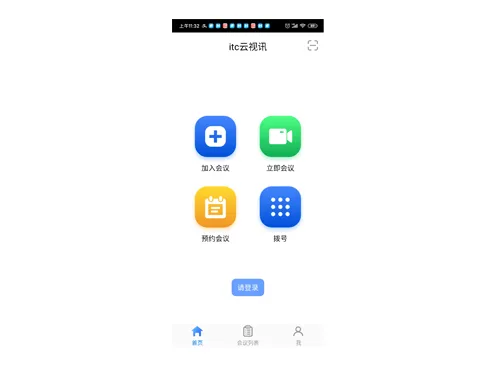
NT90-APP01AC/NT90-APP01SC/
Conference Systems · HD Video Conference System

NT90-APP01AC

NT90-APP01SC

NT90-iPad01SC

Description:

Support standard H.323 protocol, support H.264 HP codec, support HD 1080P video conference; integrated address book, call record module.

Feature:

Features

  • Support ITU-T H.323 standard protocol and has good compatibility.
  • Support QCIF, CIF, VGA, 720P, 1080P video resolution.
  • Support H.264, H.264 HP video codec protocol, support G.711, G.722, OPUS and other audio codec protocols.
  • Integrated address book, call record module.
  • Support common functions such as template switching and speech application.
  • No need for registration, enter the meeting number to join the corresponding meeting, and you can choose the meeting interactive mode or live broadcast mode.
  • Support one-click meeting initiation on the APP to quickly create a virtual meeting on the MCU and automatically join the meeting; support inviting venues to join the meeting on the APP. The meeting supports functions such as electronic whiteboard, file sharing, electronic voting, and meeting sign-in.
  • Support scheduling meetings on APP, select participants, set meeting password, chairman password, live broadcast password, meeting time, etc. After submission, the MCU will automatically hold a meeting according to the timetable. The meeting supports functions such as electronic whiteboard, file sharing, electronic voting, meeting sign-in.
  • Support switching between live broadcast mode and meeting mode on the APP. The meeting mode supports functions such as electronic whiteboard, file sharing, electronic voting, and meeting sign-in.
  • Support automatic paging for opening the video screens of all venues, each page has up to 4 split screens, and you can slide left and right to switch between different pages to watch different videos. The auxiliary screen sent by the venue will be displayed on a single page in full screen. You can click the shortcut key or slide left and right to switch to the full-screen auxiliary stream.
  • Support the annotation function of the auxiliary stream, and make real-time annotations on the auxiliary stream screen when receiving the auxiliary stream; set three different pen thicknesses, five pen colors, and set annotation graphics such as circles, squares, arrows, and lines.
  • Support the function of sending auxiliary streams, and the screens can be shared in the form of auxiliary streams.
  • Support echo cancellation, noise suppression and other functions, bringing a good user experience.
  • Support IP network packet loss repair mechanism; under 30% packet loss rate, the sound is continuous and the video is smooth, without lagging and blurring; under 80% packet loss rate, the sound is clear and can be accurately understood.
  • Support meeting sign-in, electronic whiteboard, electronic voting, file sharing and other functions to meet the needs of remote training, teaching and other scenes.
  • With excellent device compatibility, support joining the meeting on WIFI, 4G, and 5G networks.
  • Support text chat and sending/receiving emoticons when watching live broadcast.
  • Support setting the delay grade of live broadcast, including 3 options: smooth, moderate, and real-time.

Request a quote for this product